
For independent instructors
Your working day,
connected.
Driving instructor software for the lesson and everything around it: the pupil, the time, the progress and the business record.
Explore the working dayA clearer view of your teaching day
Planned Essential: £12.99/month per teaching Instructor. View planned prices ↗
Plan. Teach.
Record.
Follow up.
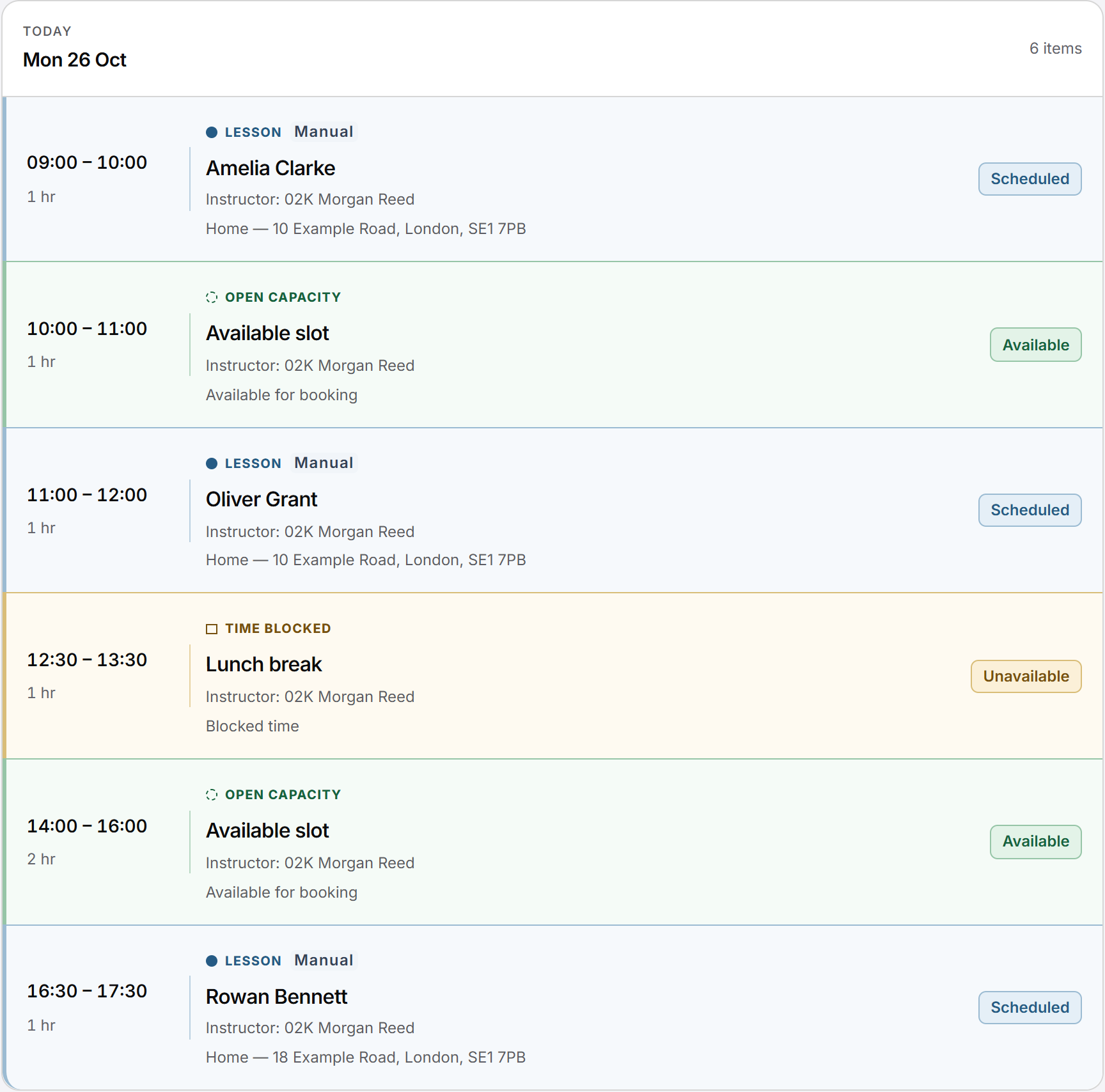
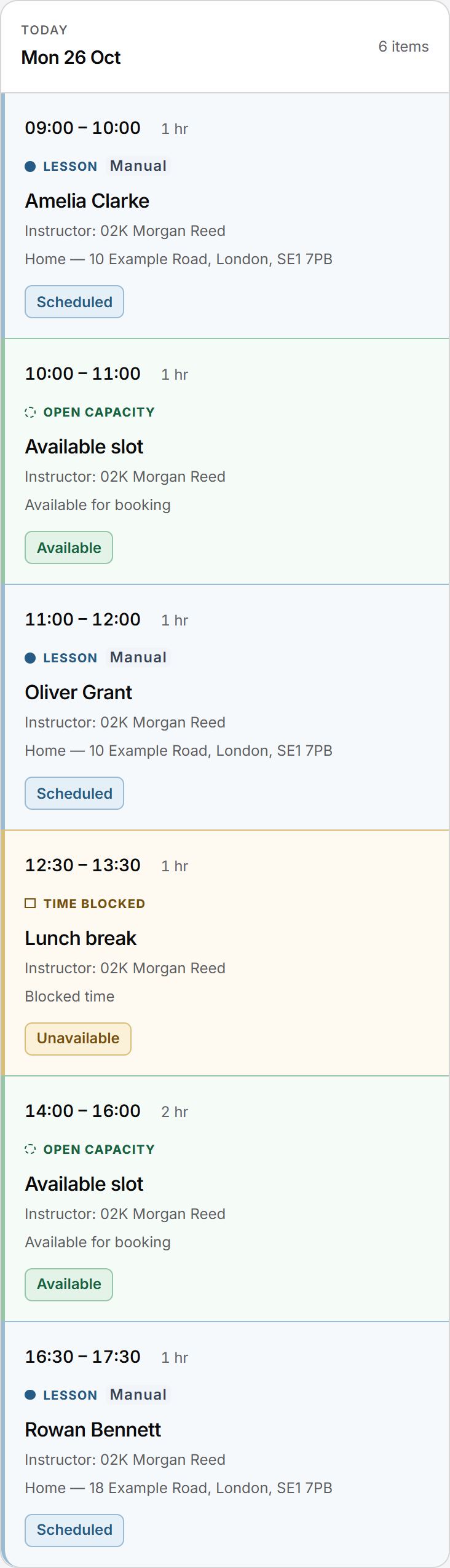
The practical picture
What can you manage in one place?
Start with the day ahead, then move into the pupil or Lesson without rebuilding the context. Working hours, locations and recurring Lessons give the diary a useful shape. Pupil history, feedback, progress and manually recorded receipts stay connected to the work they describe.
Use the responsive web workspace on a phone, tablet or computer. There is no native app today.
The connected working day
Plan. Teach. Record. Follow up.
You should be able to move from the day’s appointments to the pupil’s story, without piecing it together from separate lists.
Plan the work
Check booked lessons against your working pattern. Keep lunch or meetings as unavailable time and any open teaching capacity clearly separate. Saved locations give the appointment a practical meeting point.
Prepare to teach
Open the pupil record for earlier lessons, syllabus topics and published feedback. Those records support your next conversation; they do not make a test-readiness decision for you.
Record what happened
Keep the lesson record and progress in context. Record money actually received, then review pupil credit and, where enabled, lesson charges.
Carry it forward
Published feedback gives the pupil something to return to. A request for another time can be handled alongside the diary rather than silently changing a confirmed lesson.
Your workspace, your appearance
Make Miles & Minutes yours.
Choose a palette that suits you, with Light, Dark or a mode that follows your device. Appearance changes the presentation; your Lessons, records and product behaviour stay the same.
Wednesday · 14 October
Catppuccin
Soft lilac, a calmer backdrop.
Wednesday · 14 October
Miles
The familiar Miles & Minutes appearance.
Wednesday · 14 October
Midnight
Deep blue surfaces for a darker workspace.
Wednesday · 14 October
Forest
A fresh green accent.
Four looks from the existing theme library. Illustrations use product colours and fictional records; they are not screenshots of the current application.
Read the current-workspace guidance ↗A pattern that can change
Regular pupils, real-world interruptions.
Working hours describe when you normally teach. Weekly or fortnightly recurring lessons give regular pupils a pattern. Blocked time protects your other commitments, while an available lesson time is a specific opening you choose to offer.
These are different commitments. A gap in the calendar is not automatically published for booking, and an open slot is not yet a pupil lesson. The Diary and scheduling page explains the views and time states in more detail.
When plans change, rescheduling and cancellation retain lesson history. A pupil’s request is handled through the booking workflow, so asking to move Tuesday’s lesson does not itself move the appointment.
Beyond the calendar
The pupil and the business record travel together.
A pupil profile brings together contact context, saved locations, lesson history, syllabus progress and recorded test information. Published feedback is distinct from internal notes. The pupil sees only the information their own workspace permits.
Money remains a separate set of facts: a payment received, available pupil credit and a lesson charge where lesson accounting is enabled. Correcting a payment preserves the original and the reasoned correction.
Explore pupil records and progress, recorded payments and pupil credit, and requests and confirmation for the individual workflows.
Fictional working-day example
Amelia’s next lesson starts with the last one.
Before a regular lesson, an instructor checks Amelia’s previous feedback and meeting point. After teaching, they record the work and publish feedback for her to read. If Amelia asks for a different time next week, the request remains separate until an authorised change is confirmed.
If she has paid by bank transfer, the instructor records what was received. The Money record explains the balance without assuming that recording a lesson also means receiving a payment.
This is an illustration of connected records, not a promise of an automated sequence. Read the Diary and scheduling information for the scheduling context.
Questions answered
Before you get started.
Find answers to common questions about this part of your working day.
Is Miles & Minutes a native app?
It is responsive web software today, with no native iOS or Android app offered. You can use the web workspace on a phone, tablet or larger screen.
Can I plan recurring lessons?
Yes. Weekly and fortnightly recurring lessons support regular pupils. Working hours and unavailable time stay separate from those booked appointments.
Can pupils see their progress?
Authorised pupils can see shared syllabus progress and published feedback in their own workspace. Internal notes do not automatically become pupil-facing.
Does recording a payment collect money?
No. You can record money already received, such as cash or a bank transfer. Pupil card payments through Miles & Minutes are not currently enabled.
Can I move my existing data into Miles & Minutes?
There is no public self-service migration offer or promise that every existing system can be imported. Discuss your records and onboarding needs before assuming a move will be supported.
For a concise reference to access, mobile delivery and product boundaries, read About Miles & Minutes.
Practical reading
Work through the question.
Keep exploring
See how it connects.
Choosing a system? Compare driving instructor software.
Early Access
Register your interest.
Register interest in an upcoming cohort. An invitation or launch benefit is not guaranteed.